Skip to Main Content

Faculty Expertise, Profiles & Metrics

Showcasing UMSL Faculty works online

UMSL Profiles

Profiles.umsl.edu is a site for promoting and sharing faculty research. It is an online research profile to make your research more available. These profiles are a service of the UMSL Library and the technology is related to scopus, so be sure to check your scopus profile! If you do not find your profile at Profiles.umsl.edu please contact IRL@umsl.edu.


Profile Image of Christopher Spilling

Scopus Author Profiles

Scopus

​​​​​​​Screenshot of Christopher Spilling's Scopus Profile

ORCID

ORCIDORCID Author Profile

What is ORCID?  icon links to ORCID video
ORCID provides a persistent digital identifier that distinguishes you from other researchers.

Why should I have an ORCID ID?
ORCID allows you to easily and uniquely attach your identity to all kinds of scholarly work:  datasets, articles, books and book chapters, media stories, theses, protocols, patents, etc. ORCID helps researchers distinguish your work from other scholars with similar names.

ORCID IDs are now being used by many journal publishers and databases such as Nature Publishing Group, IEEE, PLoS, Scopus and Web of Science.

How do I use my ORCID ID?
Include your ORCID identifier on your Webpage, when you submit publications, apply for grants, and in any research workflow to ensure you get credit for your work.

How do I get an ORCID ID?
Register for a free ORCID ID
ORCID registration quick start guide
Once you register, you can enhance your ORCID record with your professional information and link to your other identifiers such as Scopus and Web of Science.

ORCID registrants who use their unique ORCID identifier (iD) when submitting a manuscript or dataset can now opt to have their ORCID record automatically updated when their work is made public. Auto update details

How do I find ORCID IDs?
ORCID ID's are designed to be open and accessible to all.
Go to the ORCID registry to look up your own ORCID ID or to look for ORCID IDs of other researchers.  Click on an ORCID ID to see a researcher's list of publications.


ResearcherID & Publons


What is the Web of Science ResearcherID? 
ResearcherID is an identifying system for scientific authors. The system was introduced in January 2008 by Thomson Reuters.

In April 2019, ResearcherID was integrated with Publons, a Clarivate Analytics owned platform, where researchers can track their publications, peer reviewing activity, and journal editing work. With ResearcherID now hosted on Publons researchers can keep a more comprehensive view of their research output and contributions in one place. This is particularly important for researchers in fields that predominantly use peer-reviewed conference articles (computer science) or in fields that focus on publishing books and chapters in books (humanities and disciplines in the social sciences).

Publons is a profile tool for tracking your publications, citation metrics, peer reviews, and journal editing work in a single profile.
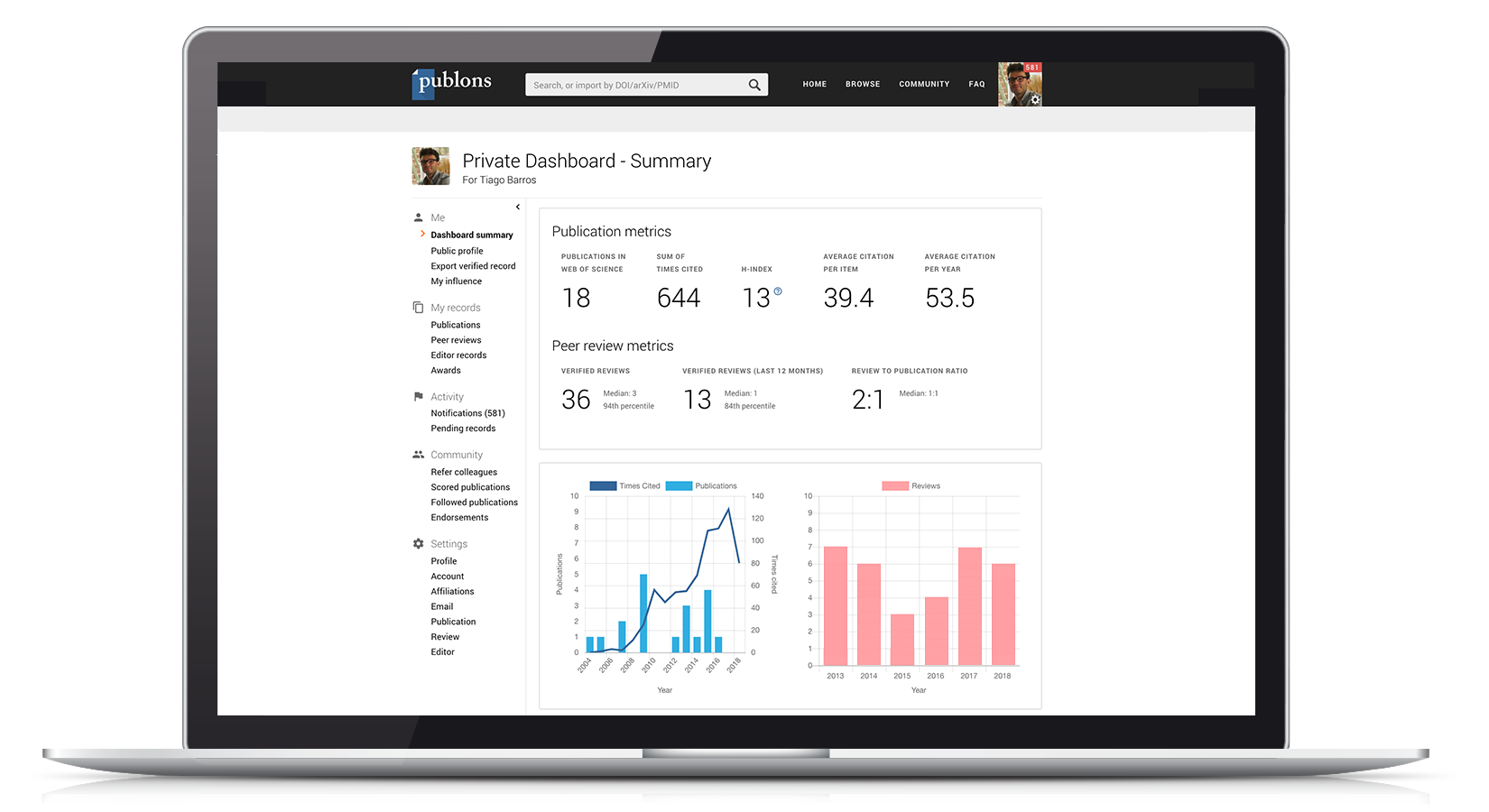
  • All your publications, instantly imported from Web of Science , ORCID, or your bibliographic reference manager (e.g. EndNote or Mendeley)
  • Trusted citation metrics, automatically imported from the Web of Science Core Collection
  • Your verified peer review and journal editing history, powered by partnerships with thousands of scholarly journals
  • Downloadable record summarizing your scholarly impact as an author, editor and peer reviewer.

Screenshot of Publons profile.

Google Scholar Profile

Google Scholar Citations

Your profile is created from data found in Google Scholar after you register.

Screenshot of David Kimball's Google Scholar Profile

Academia.edu

Academia.edu Screenshot of James Bashkin's Academia.edu Profile

  • Your profile is created from social networking analytics generated on Academia.edu after you register.
  • Academia.edu is a commercial site despite the .edu in it's address.
  • Users can upload or download papers from other profile pages. If papers are not uploaded, one can request to have the paper sent by the author/contributor. Caution: Check your copyright agreement with the publisher before uploading articles.
  • Tracks how many times the paper has been downloaded.
  • Used by humanities scholars and more!
  • Metrics Mania the case against Academia.edu (Chronicle of Higher Education, January 18, 2018)

Biosketch (NIH)

Read the whole SciENcv for Creating a Biosketch guide at 

Amazon Author Page

Scott D. Peterson Amazon Author Profile

Amazon.com Author Pages

  • Add your biography, photos, blog, and video to an author page that will display in Amazon


IRL@UMSL Poster

The top banner reads "UMSL Institutional Repository Library" in large, red, sans-serif font. The poster is divided into several sections. The left side features a photograph of a building with trees displaying autumn foliage, possibly on the UMSL campus. Below the photo are contact details: "CALL: 314.516.5084" and "EMAIL: IRL@umsl.edu," followed by "VISIT: https://IRL.UMSL.edu." Further down on the left, there's a section titled "UMSL FACULTY PROFILES." It states, "The library is showcasing faculty expertise, works, and accomplishments at https://profiles.umsl.edu/." Below this is a screenshot of a website search interface, featuring the UMSL logo and a search bar, with several faculty profiles displayed, showing names and small profile pictures. The middle section, titled "THE IRL AND FACULTY EXPERTISE PROFILES INCREASE," lists benefits such as Discoverability, Readership, Impact, Visibility, and Engagement. The text explains that the Institutional Repository Library (IRL) gathers, disseminates, and preserves works from the UMSL community, hosts works from members, and provides a web resource. It also mentions that the IRL collects analytics and provides reports on how often and from where works are viewed and downloaded. The IRL supports student scholarship by providing a platform for submitting and showcasing theses, dissertations, and other student works. This section includes a graphic with the words "OPEN ACCESS" in red, followed by the "CBR" logo (Creative Commons, OpenAIRE, ORCID, figshare, zenodo, re3data.org) and "OPEN EDUCATIONAL RESOURCES," with Creative Commons licensing icons below. The right section is titled "THE IRL. SUPPORTS A WIDE ARRAY OF OPEN ACCESS FACULTY SCHOLARSHIP." It lists categories of materials supported: Articles (Technical Reports, Working Papers, Post-print, Pre-print), Books, Presentations, Sound Recordings, Video Recordings, Conference Proceedings, Data Sets, and Open Educational Resources. Below this, there's a section titled "DATA MANAGEMENT SERVICES FROM THE UMSL IRL." It lists services: Promote and share your research data Encourage collaboration Customize your metadata Use persistent URLs for curation and discoverability Preserve your legacy The bottom right corner features a cartoon illustration of a person carrying a large, heavy box labeled "DATA REPOSITORY" with "Submissions welcome" written on it. The person is walking up a path. This illustration is attributed to "Illustration by Blake Uhinga."